
01
Tools stay on the left
Selections, move tools, magic wand, fill, gradient, brush, eraser, pencil, text, and shapes remain close to the canvas.
For Paint.NET users moving to Mac
Pixelcasso brings the familiar layers, history, selections, tools, and canvas-first workflow you already know to a fast native Mac app—then adds Generative Fill for the edits you want to take further.
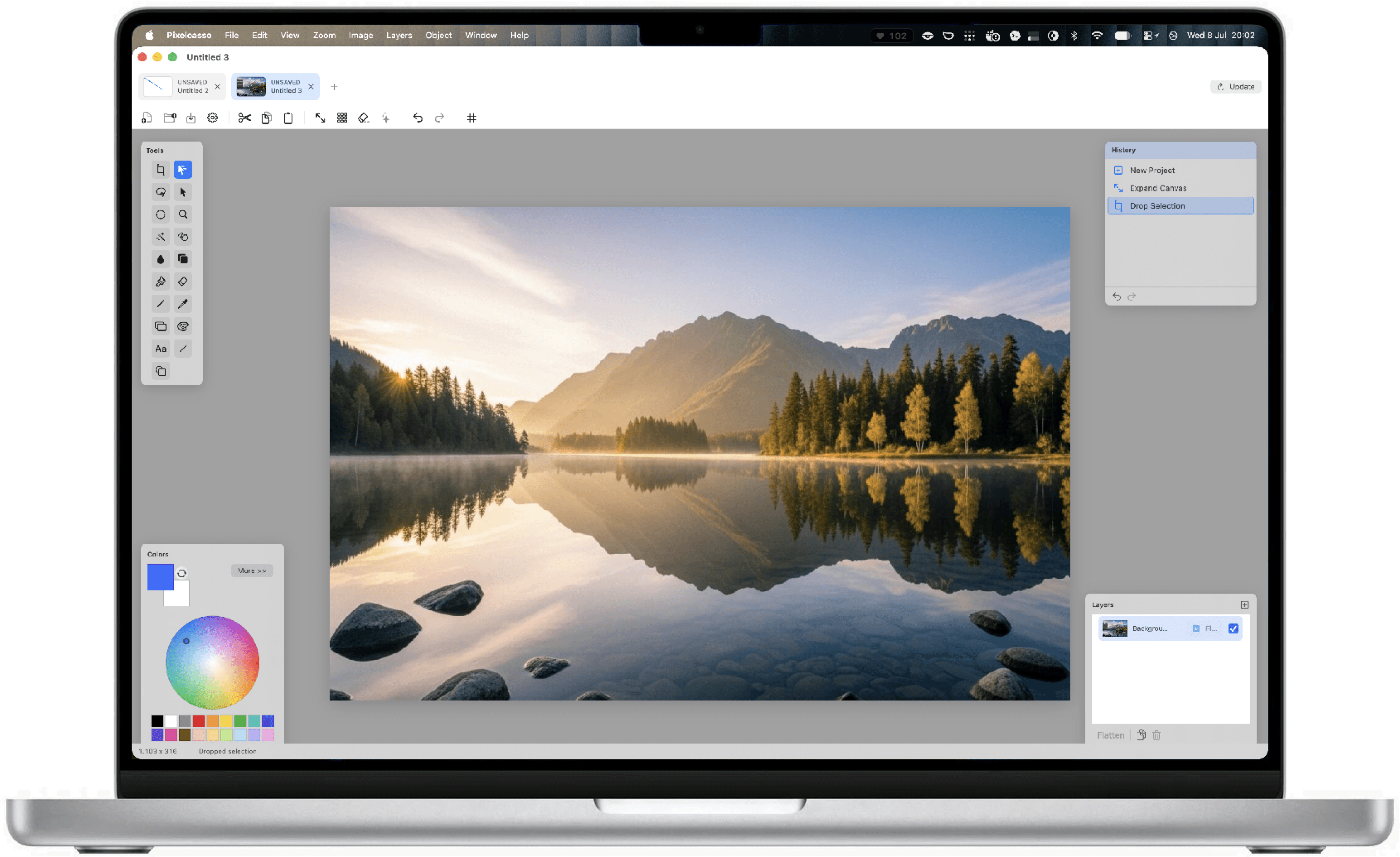
Switch without relearning
Pixelcasso is independently developed for macOS and translates the focused spatial logic that makes this workflow quick to remember: tools left, the canvas central, colors below, and layers plus history on the right.
1234Selections, move tools, magic wand, fill, gradient, brush, eraser, pencil, text, and shapes remain close to the canvas.
Every meaningful action lands in a dedicated history panel, with direct undo and redo controls.
Primary and secondary colors, the hue wheel, and a compact palette live in the lower-left workspace.
Rename, reorder, hide, duplicate, merge, lock, and tune opacity without leaving the main editor.
A factual comparison
Pixelcasso puts layers, selections, history, painting, transforms, text, quick actions, and flexible export into a fast native Mac workspace. Premium adds Generative Fill, giving the familiar canvas-first workflow a distinctly modern advantage.
Review Paint.NET’s official site| Workflow or capability | Paint.NET | Pixelcasso |
|---|---|---|
| Native platform | Windows 10 and 11 | macOS 14+ on Apple silicon |
| Layers and layer opacity | Included | Included |
| History panel with undo and redo | Included | Included |
| Rectangle, ellipse, lasso, and magic-wand selection | Included | Included |
| Paintbrush, pencil, eraser, fill, gradient, and text | Included | Included |
| Move selected pixels and selection outline | Included | Included |
| Adjustments and effects | Extensive | Fast everyday essentials |
| HEIC, TIFF, and SVG file support | Not built in | Included |
| Plugin ecosystem | Extensive | Integrated native toolkit |
| Native editable project format | .pdn | .pixelcasso |
| Open Paint.NET .pdn projects | Yes | Easy PNG or TIFF handoff |
| Generative Fill | Not built in | Premium beta · Bring your API key |
Comparison reviewed July 16, 2026 against the public Paint.NET product, documentation, and Pixelcasso 2.4.2. Paint.NET and .pdn are not bundled with Pixelcasso.
The move to Mac
Save important Paint.NET work as PNG or TIFF, then open it directly in Pixelcasso. These widely supported formats make the move straightforward.
Use File › Open, drag an image onto the welcome panel, or paste directly from the clipboard. Pixelcasso turns it into a native editable project.
Choose tools on the left, follow changes in History, organize Layers on the right, then save a .pixelcasso project or export the result.
Built-in quick start
On first launch, Pixelcasso shows Paint.NET users where tools, colors, history, layers, and essential Mac shortcuts live. Reopen the guide any time from the Help menu.
Questions, answered
No official macOS version is published. Paint.NET currently supports Windows. Pixelcasso is a separate, independently developed Mac application for people who want a familiar focused workflow.
No. Pixelcasso is independent and is not affiliated with, endorsed by, or sponsored by dotPDN LLC.
Export your artwork from Paint.NET as PNG, JPEG, TIFF, or another common image format, then open or drop it straight into Pixelcasso. Pixelcasso creates a native editable project from it; .pdn-specific layers and plugins stay with Paint.NET.
The essentials do: Command-Z for undo, Command-S for save, Command-N for a new project, and Command-O to open. Pixelcasso uses standard Mac modifier keys and conventions.
Pixelcasso brings the workflow Paint.NET users value most—layers, visible history, precise selections, painting, text, transforms, and flexible export—into a fast native Mac app. Premium also adds Generative Fill for ambitious edits without leaving the canvas.
Yes. The complete everyday editor and unlimited editable project files are free, with PNG and JPG export up to 720p carrying a small Pixelcasso watermark. No card is required.

Your familiar workflow has a Mac home
Download Pixelcasso for an Apple-silicon Mac running macOS 14 or newer. Start with the free core editor—no card required.
Download Pixelcasso